How: WFMT Playlist Scraper
I love classical music! When coding, I'll either listen to classical music or electronic music like Aphex Twins. My biggest struggle is finding new music, but I've started listening to WFMT for new songs. As I write this article, I have the station on.
Link to Spotify Playlist: https://open.spotify.com/playlist/2IGtyMcGRFpblOKab0gmFX?si=40f927c66b024386
The Idea
On the WFMT website, there is a page with the list of music played for that day and the ability to listen to past shows. I like to listen live, but I go on walks/drive where I need an offline version. The structure of the schedule page has the composer and title of the song all in one line making it easy to grab. My idea was to have code that would scrape all the titles and add it to a Spotify playlist so it would be faster than manually adding 100+ songs everyday.
Main Overview
I created a JavaScript function that I can copy and paste into the Chrome Dev Tools that copies all the song titles to my clipboard. Then I used Flask and Spotify's API to enter the playlist title and paste the song titles into a textbox. With a for loop, I searched each song title up to get a unique ID. Once I had that ID, I could add it to the created playlist.
Using JavaScript to Copy Song Titles
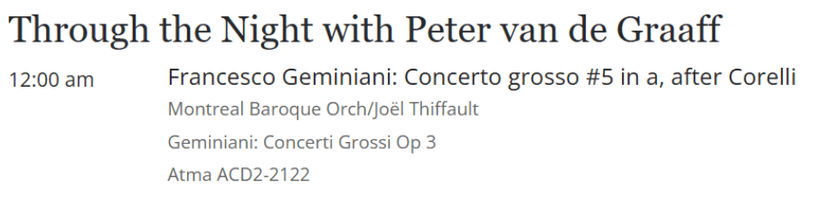
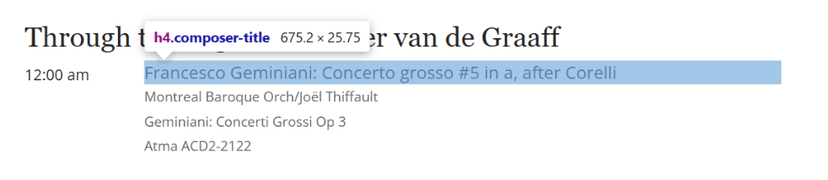
Each song was contained in a div with the class item-info. I selected all matching divs and in a for loop extracted the text content of the composer-title, orchestra-conductor, and soloists. Some errors had to be handled like the website sometimes lists the host’s name under composer-title. I ignored these instances by checking whether the song title also contained a div with the class soloists.
Since Chrome Dev Tools doesn’t allow exporting files directly, I used the copy() function, which copied the song titles to the clipboard. I used a small JavaScript snippet pasted into Dev Tools instead of Selenium or Requests because I only needed to interact with a single page once to create a playlist. Selenium felt like overkill, and I prefer generating real browser traffic to WFMT rather than simulating a bot.
Adding Songs to Spotify Playlist
Once I copy the song titles from WFMT's page using the JavaScript snippet, I paste them into a textbox on a Flask webpage. The Flask app handles the Spotify authentication and I found the base template for this workflow on this Github repo. After logging in with my Spotify account, the app stores the access token in a session so it can make authorized API calls.
In order to store variables like the access token, user ID, playlist ID, and headers I used session for persistance across requests. I'm new to Flask, so perhaps there's a better way to share variables that were user input, but any other way resulted in an error.
The app first creates a new playlist on my Spotify account and stores the unique playlist ID in a variable so it can be used later to add songs. Each song title is searched using Spotify's API. I had it return only one result and used text similarity with Bag of Words and cosine similarity to make sure the correct song is selected and avoid mismatch. Originally, I did not anticipate this feature, but I learned Spotify doesn't have that extensive library of classical music and a lot of songs played on WFMT I could not find anywhere. Sometime's Spotify still adds the wrong song, so I go through and just delete the added songs that are obviously not classical music. I manually compared the WFMT and Spotify songs for accurary as well as seeing if any songs that could be added were being missed. For the most part it is accurate, but I'll make sure to remove any songs that obvious aren't meant to be there. After collecting the correct Spotify track URIs, the app adds them to a newly created playlist. To avoid API limitations of 100 songs per request, the song list is split into two because I know there won't be over 200 songs in a day.
Fun Things I Learned

- Simple is best: The JavaScript code copies all the song titles in the above format to my clipboard. When I paste it into the textbox, I need to convert it from a string of lists to an actual Python list. Instead of using complex regex, I realized the separator was always a comma followed by four spaces, so I used
new_songs = b.split(", ")as a simple solution. - Working with JSON!: Learned how to access really long JSON responses using
type()andlen()because I kept trying to access a dict when it was actually a list (or vice versa). - Plans can change: I didn't realize how many revisions I make to a project until now. I had many ideas for this project like making it a Chrome extension, embedding it directly on my website, or doing it in one step, but I ended up with a multi-step process. Before, I'd get very stuck on staying with an idea even if there was an easier route like this.
- Journaling is fun: This was my first time combining journaling and coding. My private notes contain my entire thought process, feelings, and what else I was doing that day. It's fun to look back and see what I learned!
Final Thoughts
This project is one where I've learned and had the most fun so far! For the first time, I knew how to break down this project into easy parts. I had to look up tutorials and at StackOverflow every step of the way, but it felt cool to feel like I'm "good" at researching and that I could do this without AI. The Spotify playlist is missing songs from the website due to Spotify not having them or because of my code logic, but it consistently gets enough songs that I think this is a great way to listen to WFMT offline!
Also you should donate to WFMT if you enjoy the station like me! I was going to link their donation page, but it's probably not best to click random links from strangers when it involves your credit card info!